# PICO9918 PRO
Modern replacement for the classic TMS9918A family of VDPs
- **Seller:** [Troy Schrapel (visrealm)](https://lectronz.com/stores/visrealm), MOUNT BARKER, SA, Australia
- **Price:** $49.00 (USD, before shipping and taxes)
- **Availability:** In stock
- **Categories:** Retrocomputing, Raspberry Pi, Components
- **HS code:** 854290
- **Product page:** https://lectronz.com/products/pico9918pro
## Options
**Output**
- VGA (20 left)
- HDMI [Add $20.00] (6 left)
- SCART RGB [Add $4.00] (5 left)
**Socket**
- -
- Dual wipe [Add $1.00] (0 left)
- Turned pin [Add $2.50] (3 left)
**Additional cables**
- -
- 150mm (6") [Add $1.00]
- 200mm (8") [Add $1.00]
- 300mm (12") [Add $1.00]
- 400mm (16") [Add $2.00] (1 left)
- 120mm (5"), 150mm (6") and 200mm (8") [Add $2.50]
## Links
- [Documentation](https://github.com/visrealm/pico9918/wiki)
- [Code](https://github.com/visrealm/pico9918)
- [Schematics](https://github.com/visrealm/pico9918/tree/main/pcb)
## Images


## Description
# PICO9918 PRO
A drop-in replacement for a classic TMS9918A family of VDPs powered by the Raspberry Pi Pico RP2350.
The PICO9918 PRO can replace all classic VDP models (TMS9918, TMS9918A, TMS9928A, TMS9929A, TMS9118, TMS9128, TMS9129), providing a crisp [VGA, HDMI or SCART RGB](#output-options) signal from your retrocomputer.
The PICO9918 has been tested on over 30 classic models of TI-99, Coleco, MSX, NABU, Memotech, Sega and many more. See the [full list of supported devices below](#supported-devices).
## Output options
The PICO9918 (v1.2+) now supports three crisp output options provided by optional dongles.
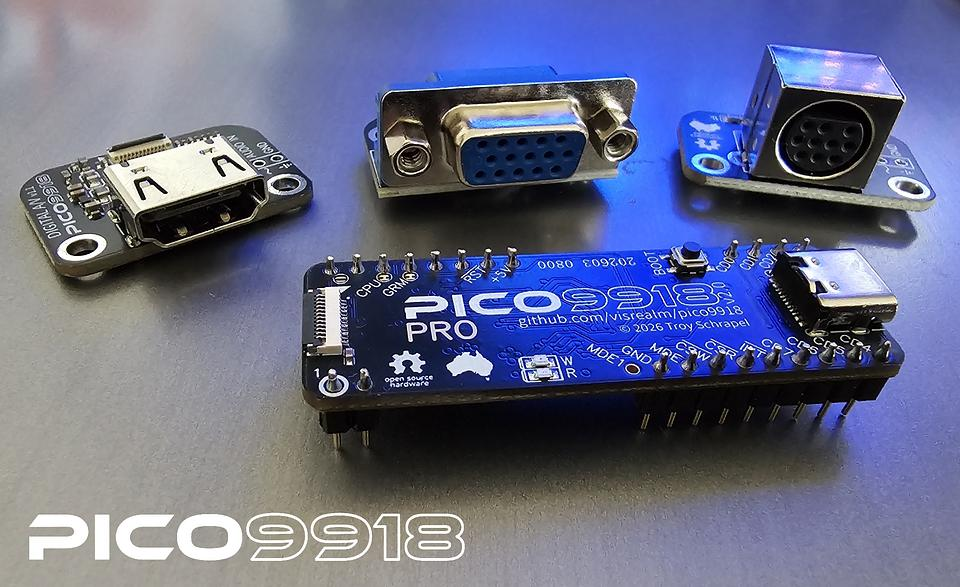
* [VGA Dongle](https://lectronz.com/products/pico9918-vga-dongle)
* [HDMI AV Dongle (with audio)](https://lectronz.com/products/pico9918-hdmi-dongle)
* [SCART RGB AV Dongle (with audio)](https://lectronz.com/products/pico9918-scart-rgb-dongle)
## Configurator
The configurator is a software tool used to modify PICO9918 configuration options, including:
* Clock rate
* Scanline CRT effect
* Scanline sprite limit
* Default palette
Additionally, firmware updates can be provided via the Configurator. The full configurator is available for the **TI-99/4A**, **ColecoVision** and **MSX**. With cut-down builds (without firmware updates) available for several other machines.
For full details, see the [Configurator](https://github.com/visrealm/pico9918/wiki/Configurator) wiki page.
See the configurator in action:
[](https://youtu.be/PBArYupT9qM?t=9)
## F18A compatibility
The PICO9918 PRO also includes F18A compatibility. The video below was captured directly from the PICO9918 VGA output running various F18A demos on a TI-99/4A.
[](https://youtu.be/TabTIPL1xQY)
## Open source
The hardware and firmware is completely open source, allowing you to make modifications and design your own VDP features... in C.
The full source code and firmware binaries is available on GitHub: https://github.com/visrealm/pico9918
## What do you get?
- Fully assembled and tested PICO9918 PRO v2.0 PCB
- VGA or HDMI connector board
- 300mm FFC cable
**Options and extras**
- All PICO9918 PRO's are shipped with a 300mm cable and VGA or HDMI dongle. Additional cables of varying lengths are available. For some machines, a shorter cable might be better suited.
- IC Sockets can be supplied. Some machines do not require an IC socket because they were shipped from factory with the VDP in a socket. Examples being the TI-99/4A and NABU Personal Computer. Others were soldered to the main board (ColecoVision, Adam, Creativision) and require desoldering and a socket soldered in place of the VDP for easier future replacement. I offer both dual wipe and turned pin sockets - both work well.
- The various dongle options are now available as separate products.
## Supported devices
This is a list of devices the PICO9918 has been tested and confirmed to work on.
* [ColecoVision](https://en.wikipedia.org/wiki/ColecoVision)
* [Coleco ADAM](https://en.wikipedia.org/wiki/Coleco_Adam)
* [AtariBits CV-NUC+](https://ataribits.weebly.com/cv-nuc.html)
* [Bit Dina 2 in one](https://segaretro.org/Dina_2_in_one)
* [Memotech MTX500](https://en.wikipedia.org/wiki/Memotech_MTX)
* [MSX](https://en.wikipedia.org/wiki/MSX)
* [Casio MX-10](https://www.msx.org/wiki/Casio_MX-10)
* [Casio PV-7](https://www.msx.org/wiki/Casio_PV-7)
* [Casio PV-16](https://www.msx.org/wiki/Casio_PV-16)
* [Gradiente Expert XP-800](https://www.msx.org/wiki/Gradiente_Expert_XP-800)
* [National CF-2700](https://www.msx.org/wiki/National_CF-2700)
* [Sanyo PHV-30N](https://www.msx.org/wiki/Sanyo_PHC-30N)
* [Sharp HB-8000](https://www.msx.org/wiki/Sharp_HB-8000)
* [Sony HB-75](https://www.msx.org/wiki/Sony_HB-75)
* [Spectravideo SVI-728](https://www.msx.org/wiki/Spectravideo_SVI-728)
* [Toshiba HX-10](https://www.msx.org/wiki/Toshiba_HX-10)
* [Toshiba HX-21](https://www.msx.org/wiki/Toshiba_HX-21)
* [Yamaha CX5M](https://www.msx.org/wiki/Yamaha_CX5M)
* [Yamaha YIS-503](https://www.msx.org/wiki/Yamaha_YIS-503)
* [NABU Personal Computer](https://en.wikipedia.org/wiki/NABU_Network)
* [Powertran Cortex](http://powertrancortex.com/)
* [Sega SG-1000 / SC-3000](https://en.wikipedia.org/wiki/SG-1000#SC-3000)
* [Sega SG-1000 II](https://segaretro.org/SG-1000_II)
* [Sord M5](https://en.wikipedia.org/wiki/Sord_M5)
* [Texas Instruments TI-99](https://en.wikipedia.org/wiki/TI-99/4A)
* [Texas Instruments TI-99/4](https://en.wikipedia.org/wiki/TI-99/4)
* [Texas Instruments TI-99/4A](https://en.wikipedia.org/wiki/TI-99/4A)
* [Texas Instruments TI-99/4QI](http://www.mainbyte.com/ti99/computers/ti99qi.html)
* [Dan Werner TI-99/22](https://github.com/danwerner21/TI99_22)
* [Tomy Pyūta / Tomy Tutor](https://en.wikipedia.org/wiki/Tomy_Tutor)
* [Tomy Pyūta Jr](http://videogamekraken.com/pyuta-jr-by-tomy)
* [VTech CreatiVision / Dick Smith Wizzard](https://en.wikipedia.org/wiki/VTech_CreatiVision)
Homebrews:
* Troy Schrapel's [HBC-56](https://github.com/visrealm/hbc-56)
* Stuart Connor's [TM990](http://www.stuartconner.me.uk/tm990/tm990.htm)
* John Winans' [Z80-Retro](https://github.com/Z80-Retro)
* Martin's [Z80Ardu](https://www.dev-tronic.de/?p=74)
If you have tested the PICO9918 PRO on any other device, please let me know and I'll happily update this list. :)
### Unsupported devices
So far, there aren't any.
## Shipping policy
All orders are usually shipped with tracking within 3 business days.
US customers please note import tariffs and associated fees will be collected during checkout. You will not need to pay any extra upon arrival.
UK customers please note VAT will not be collected and orders with items totalling under £135 (approx. €150) should not attract any import duties.
EU customers please note VAT will NOT be collected and paid for all orders. You will need to pay the VAT and customs duty upon arrival.
If the store is showing shipping unavailable to your location, please reach out and I will add a shipping rate for you.