This product was designed by Sonocotta store.
By buying this product you support original hardware creators.


ESP32-based media center device with a HiFi DAC (PCM5100) and a powerful D-class amp (TPA3118)
What is it
Amped Esparagus is the next step in the Esparagus media center line of devices. It is a device based on PCM5100 HiFi DAC (just like HiFi Esparagus) but adds a powerful and efficient D-class amp (TPA3118) so it can drive speakers directly. It has similar power capabilities to the Louder Esparagus, but it is much simpler to setup and use, since this DAC doesn't need any configuration steps to get going, just a valid I2S audio stream. Since it has an analog stage, you can use it either with a built-in amp or with an external amp, if prefer so.
New: Amped Esparagus Plus (S3) swaps in an ESP32-S3 and an I2C-controlled PCM5122 DAC (versus the fixed-configuration PCM5100A on the classic ESP32 boards), keeping the same TPA3118 amp, screen, and rotary encoder. It adds a front-facing I2S microphone, so it can also be used as a voice-assist device for your Home Assistant setup.
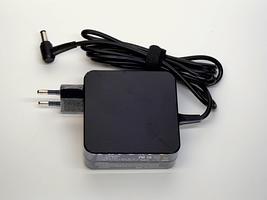
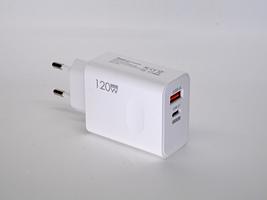
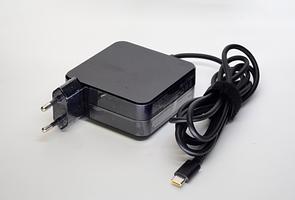
It is highly efficient, but demanding for power when cranked, therefore it uses either a USB-C Power Delivery to pull up to 65W from the wall power adapter or external power source for NOPD variant.
It can be used both with Wi-Fi and Ethernet (to make sure bad Wi-Fi would not interrupt the stream)
Features
| Amped Esparagus (TPA3110) | Amped Esapragus (TPA3118) | Amped Esparagus Plus (S3) | |
|---|---|---|---|
| MCU | ESP32-WROVER-N8R8 | ESP32-WROVER-N8R8 | ESP32-S3-WROOM-N8R8 |
| DAC | PCM5100A 32-bit Stereo DAC -100 dB typical noise level |
PCM5100A 32-bit Stereo DAC -100 dB typical noise level |
PCM5122 32-bit Stereo DAC (I2C-controlled) -100 dB typical noise level |
| Amp | TPA3110D2 D-class amp | TPA3118D2 D-class amp | TPA3118D2 D-class amp |
| Line-out | 2.1V RMS | 2.1V RMS | 2.1V RMS |
| Line-in | N/A | ✅ | ✅ |
| Output (4Ω, 1% THD+N) | 2x 25W | 2x 40W | 2x 40W |
| Output (8Ω, 1% THD+N) | 2x 25W | 2x 25W | 2x 25W |
| Output (Bridge, 3Ω, 1% THD+N) | 1X 40W | 1X 60W | 1X 60W |
| IR reader | ✅ | ✅ | ✅ |
| RGB LEDs | ✅ | ✅ | ✅ |
| I2S Microphone | ❌ | ❌ | ✅ |
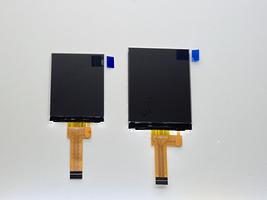
| Screen | 1.3' 128 x 64px OLED | 2.0' 320 x 240px TFT | 2.0' 320 x 240px TFT |
| Rotary Encoder | ✅ | ✅ | ✅ |
| Flash/PSRAM | 8MB/8MB | 8MB/8MB | 8MB/8MB |
| Connectivity | WiFi + BT4.2 + BLE + Ethernet | WiFi + BT4.2 + BLE + Ethernet | WiFi + BLE + Ethernet |
| Case | 88 x 38 x 100 mm Aluminum case | 110 x 40 x 100 mm Aluminum case | 110 x 40 x 100 mm Aluminum case |
| Power requirement | Generic power adapter 9..28V or USB-PD capable power adapter | Generic power adapter 5..28V or USB-PD capable power adapter | Generic power adapter 5..28V or USB-PD capable power adapter |
| Software support | |||
| Squeezelite-ESP32 | ✅ | ✅ | ✅ (unofficial S3 support) |
| Snapclient | ✅ | ✅ | ⏳ (coming soon) |
| ESPHome (HA) | ✅ | ✅ | ✅ |
| AirPlay 1 & 2 | ✅ | ✅ | ✅ (build from source) |
⚠️ Amped boards can't drive headphones and speakers at the same time (unless you modify them)
⚠️ Amped Esparagus Plus (S3) has no Bluetooth Classic radio (ESP32-S3 limitation) — Bluetooth A2DP is only available on the TPA3110/TPA3118 (classic ESP32) boards
💡 Don't need to connect speakers? Check out HiFi Esparagus
💡 Don't need to connect headphones or an external amp? Check out Loud Esparagus and Louder Esparagus
💡 Looking for a more cost-efficient version? Check out Amped-ESP32 / Amped-ESP32-Plus
Which chip: ESP32 or ESP32-S3?
This board is available with either the 'classic' ESP32 (TPA3110/TPA3118) or the newer ESP32-S3 (Plus). They are not interchangeable for every use case, and picking the wrong one is the single most common support question — here's the short version:
- ESP32-S3 is the newer, more capable chip — more RAM headroom, a faster CPU, and native USB — but it has no Bluetooth Classic radio, so Bluetooth A2DP only works on the original ESP32.
- Squeezelite-ESP32 and standalone Snapclient: pick the classic ESP32. Squeezelite-ESP32's S3 support exists but isn't official yet, current S3 support is noticeably laggier, and standalone Snapclient isn't ported to the Plus (S3) revision at all.
- AirPlay 1 & 2: both chips are supported. The classic ESP32 adds Bluetooth A2DP alongside AirPlay and has a one-click web-installer image; the Plus (S3) drives its PCM5122 DAC with hardware volume control but has to be built from source for now.
- ESPHome / Home Assistant media player: pick ESP32-S3 (Plus). The new Sendspin renderer runs much better on the S3's extra headroom.
- Voice assistant (wake word) in Home Assistant: ESP32-S3 (Plus) is mandatory — it's the only revision with a microphone, and the classic ESP32 doesn't have the RAM/CPU headroom to run it anyway.
| Your use case | Pick |
|---|---|
| Bluetooth A2DP from a phone/laptop | ESP32 (TPA3110/TPA3118) |
| Squeezelite-ESP32 or standalone Snapclient | ESP32 (TPA3110/TPA3118) |
| ESPHome media player / Sendspin | ESP32-S3 (Plus) |
| Home Assistant voice assistant | ESP32-S3 (Plus) |
| AirPlay 1 & 2 | Either |
If none of that applies to you and you just want the safe default, pick Amped Esparagus Plus (S3) — it's the newer chip. Only choose classic ESP32 if you specifically need Bluetooth A2DP, or plan to run Squeezelite-ESP32/Snapclient today.
Onboard PSRAM
Audio streaming requires proper buffering to work, even with ESP32 500K of RAM it is a challenging task. Esparagus HiFi MediaLink is based on a WROVER module that has an onboard PSRAM chip.
Board Pinout
Audio
| I2S CLK | I2S DATA | I2S WS | PSRAM CE | PSRAM CLK | DAC EN (MAX98357A) | |
|---|---|---|---|---|---|---|
| ESP32 | 26 | 22 | 25 | 16 | 17 | 13 |
| ESP32-S3 | 14 | 16 | 15 | n/a (octal, internal) | n/a (octal, internal) | 04 |
Peripheral - Screen and W5500 Ethernet (Amped Esparagus)
| SPI HOST | SPI CLK | SPI MOSI | SPI MISO | LAN RES | LAN CS | LAN INT | DC | CS | RST | BL | |
|---|---|---|---|---|---|---|---|---|---|---|---|
| ESP32 | 2 | 18 | 23 | 19 | 14 | 5 | 35 | 4 | 15 | 32 | 21 |
| ESP32-S3 | 2 | 12 | 11 | 13 | 05 | 10 | 06 | 40 | 39 | 38 | 01 |
Mic (Amped Esparagus Plus, S3 only)
Amped Esparagus Plus (S3) has an onboard I2S microphone. It can be used for wake word functionality in the Home Assistant or for custom firmware.
| I2S CLK | I2S WS | I2S DATA | |
|---|---|---|---|
| ESP32-S3 | 17 | 18 | 08 |
Software Options
- Home Assistant smart home audio and notifications. Start from the web-installer, as soon as you configure WiFi, the boards will be discovered by the ESPHome add-in automatically. Dedicated configs can be found in the documentation for simple and stable media-player, experimental sendspin protocol, and experimental snapclient component
- Squeezelite-ESP32 Spotify Connect, AirPlay, Bluetooth or Logitech Media Server. Flash directly from your browser using the web-installer. Configure WiFi using Hotspot (default password: squeezelite). Don't forget to exit Recovery mode when done.
- Snapclient multi-room audio streaming with snapserver. Flash directly from your browser using the web-installer, as soon as you configure the WiFi board will discover the snapserver automatically
- Snapclient (edge) - developer version. Developer's version of the snapclient, less stable and more feature-rich for those who cannot wait for new features to be released. Installed via web-installer, similar to standard snapclient
- AirPlay 1 & 2 with Sendspin, Bluetooth, and a TFT display. Native, actively developed AirPlay 1 & 2 firmware (rbouteiller/airplay-esp32) with PTP multi-room sync, an experimental Sendspin renderer, and Bluetooth A2DP (classic ESP32). Flash straight from your browser with the web-installer — no toolchain needed. Amped Esparagus Plus (S3) is supported too, built from source for now. See AirPlay 2 support below for details.
- Your own software. Use Arduino IDE or Platformio IDE and the provided software samples
AirPlay 2 support
Amped Esparagus runs rbouteiller/airplay-esp32, an open-source AirPlay 1 & 2 receiver you can flash straight from your browser via the web-installer — no PlatformIO or toolchain required. It's a separate firmware image from Squeezelite-ESP32 and Snapclient above, so flash whichever matches how you want to use the board.
- AirPlay 1 & 2 — shows up natively in Control Center and any AirPlay app, with PTP-based multi-room sync
- Sendspin (experimental) — an open multi-room protocol renderer sharing the same output path and volume control as AirPlay
- Bluetooth A2DP — phones and laptops can stream directly whenever AirPlay is idle
- Color TFT display — shows track metadata and progress for AirPlay, Bluetooth, and Sendspin alike
- No on-chip DSP: the PCM5100 is a line-level DAC, so tone shaping stays in front of the TPA3110/TPA3128 amp rather than in the DAC itself
Amped Esparagus Plus (S3)
The Plus (S3) revision is now supported too, with its own amped-esparagus-plus-s3 build:
- PCM5122 with hardware volume — the I2C-controlled DAC is configured at boot and volume is applied by the DAC's own digital attenuator rather than in software; the TPA3118 amp is unmuted only while audio is playing
- Rotary encoder — turn for volume, click for play/pause
- Color TFT display, RGB LED, and W5500 Ethernet
- AirPlay 1 & 2 and Sendspin — no Bluetooth A2DP (ESP32-S3 has no Bluetooth Classic radio)
⚠️ There's no prebuilt web-installer image for the Plus (S3) yet — build and flash the amped-esparagus-plus-s3 environment with PlatformIO. The PCM5122's DSP (EQ/DRC) isn't exposed in the AirPlay web UI yet, and the onboard microphone isn't used by the AirPlay firmware.
Using with Home Assistant
Both HiFi Esparagus versions were created specifically to be used with Home Assistant via ESPHome integration. For both boards, rich configs were pre-created with hardware configuration for common use cases. These include
- media_player component for simple and robust media playback and TTS announcements (with ducking effect)
- Sendspin media player – new experimental protocol for multi-room sync with media controls and more
- An experimental snapclient component that allows near-perfect multi-room sync and seamless integration with Music Assistant
- Another snapclient fork with an implemented 15-band software equalizer and a rich set of EQ presets
- Voice assist config for Amped Esparagus Plus (S3), allowing local voice-controlled assist and automation
Configurations are being actively maintained and upgraded, new experimental components added for you to test and enjoy
Hardware
Please visit the hardware section for board schematics and PCB designs. Note that PCBs are shared as multi-layer PDFs as well as Gerber archives.
Amped-Esparagus with TPA3118/TPA3128 amp
Originally, I used the TPA3110 amp with Amped Esparagus and Amped-ESP32 boards for its simplicity and availability. The only issue with TAP3110 is that it lacks the MUTE pin. It does have an STBY pin, but as it turned out, it is not pop-free, meaning each time you switch it on and off, the amp makes a loud pop in the speakers. I tried changing the level slowly, but it didn't help.
Help came with a newer TPA3128 amp with revision H of the Amped-ESP32
- It does have a true MUTE pin, and now it is software-controlled on Amped-ESP32. It means that the board starts dead-quiet, and it stays quiet when the audio is paused
- MUTE pin also disables PCM5100 DAC on rev H, so line-out is also dead quiet (not that it was noise before, but why not?)
- It can work with 4.5V, so it plays even when powered from a simple USB-C, similar to Louder-ESP32. TPA3110 needs at least 8V to spin up
- TPA3128 has a marginally better audio quality, as they say. I cannot hear the difference 😉
⚠️ TPA3128 boards default to 1SPW modulation, which causes audible pops when exiting MUTE and a quiet static noise afterward. See errata: TPA3128 1SPW modulation pop and static noise issue for a permanent hardware fix.
On the latest revisions I'm switching over to the TPA3118 amp, replacing TPA3128 for a few reasons:
- MUTE schematic is updated to slow down voltage ramping speed on turn on – this helps reduce pop noise to “I can no longer hear it” level
- Modulation is hardwired to BD (1SPW is more efficient, but caused pops as well)
- Gain is fixed at a 20dB level – also helps with pops
- I added a band-pass input filter network to make sure it is noise-free.
Amped Esparagus power considerations
The Amped Espragus can be quite a power-hungry device, simply using 5V over the USB-C is clearly not an option. The intention for using a PD-enabled power adapter to run the board is simplicity and ease of use for customers. Ideally, you should supply a 20V 3.25 Amp capable power source, which is common for modern laptops (Dell, HP, and Lenovo have all tested and work perfectly). However, pretty much any 9V/12V/20V PD-enabled power adapter will work, most typically phone chargers with a quick charge option. The smallest of the family is a 25W model, which is plenty enough for a living space.
The interesting part was all the phone and laptop chargers I used for the test (around five different makes of each), sounded great, with no hissing, no popping. (Apart from the Apple ones, they didn’t work. Likely they have Apple-specific PD protocol). This is probably because modern devices have become so noise-sensitive that manufacturers have been forced to do good work on noise levels.
Because USB-PD is a bit of a Wild West in terms of standards, sometimes not everything goes as designed. Some people have run into this with power adapters that aren’t fully PD-standard compliant. In most cases, the worst that happens is the PD chip doesn’t trigger the 20V mode, so the Esparagus runs at around 5W per channel (which you might not even notice). One person reported that an older adapter somehow triggered just 1V on the USB-C power line, shutting down the Esparagus shortly after plugging in. Thankfully, we’ve confirmed that it works correctly with newer laptop adapters.
Amped Esparagus NOPD
The “hammer-style” solution I came up with is a new NOPD version of the Amped Esparagus that lets you use a barrel power jack to supply raw voltage directly. The catch? Standard 2mm pins can’t handle high currents, so I’ve gone with a 2.5mm pin instead — it’s a bit unusual but still common enough in the laptop world.
With this setup, you can supply more than the 20V limit of PD, giving you a bit more power for the speakers. You probably won’t hear much difference (thanks to the way human hearing works), but it could help larger speakers that need a bit more to really “open up." Other than that, the NOPD version works just like the PD version — no software changes are needed.
Amped Esparagus DUAL
In May 2025, I came up with a power mux schematic that is designed to automatically switch between an external power source and a UCB-PD-enabled power source, depending on which one provides higher voltage. So you can either use an external power adapter over the barrel jack and use USB-C for programming-debugging, or simply use USB-C for both power and data.
This eliminates the need for PD and NOPD revisions, so I will slowly replace all products with a single DUAL option.
External voltage selection
The power adapter specs depend on the speaker you're planning to use. DAC efficiency is close to 100%, so just take the power rating of your speaker (say 2x10w), and impedance (say 8 ohms) and you'd need at least 9 volts rated at 1.2 amps per channel, round up to 3 total amps.
It is not recommended to go beyond the voltage your speakers can take, otherwise, the amp will blow your speakers in no time.
The absolute maximum voltage for the TAS5805M DAC is 30V, but it is not guaranteed to be thermally stable in this condition.
Restocking & Availability
New restock batches are regularly ordered from the factory, and I plan to keep all versions available at least until the next board revision is released.
USA shipping Update
Due to the new tariffs introduced by the Trump administration, standard shipments are temporarily on hold. However, shipping to the US has now resumed via UPS, though rates are currently quite high. I’ll fully resume regular shipping as soon as the restrictions are lifted
Sponsorship & Community Support
If you’re working on an open-source project, an educational initiative, or any pro-bono/volunteer effort, feel free to reach out for sponsorship details. I’ll do my best to provide discounts or even free boards.
Custom Design & Consultation
If you’re interested in a custom design based on or inspired by my boards, I also offer contract design work and consultation when needed.
Links to code and documentation
Shipping policy
Most orders are shipped the next business day morning. All shipments are tracked. Delivery time in the EU is 3-7 days, outside 2-3 weeks, depending on the distance. After 30 days, the package is considered lost - reach out for a refund or replacement.
Here are some extras that might be useful for your project!
Amped Esparagus
Sold by Sonocotta store
$79.00
No tax for United States [change]
Stock available: 24
Volume discount | |
2+ items | $75.84 |
5+ items | $72.68 |
10+ items | $67.15 |
The seller

Smart Home and DIY Electronics